restaurant menu with QR Code

Power contactless experiences for guests

Give guests the option to explore the menu and settle bills directly from their smartphone with a unique QR code. Save service time without sacrificing experience.

Restaurant booking management software
Trusted by over 36.000 restaurants around the world
Yaya logoDebuik wordmark logo in lowercase gray text on a transparent background.Black and white abstract pattern with blocky shapes and vertical lines.Oostwegel Collection logo with stylized wings above the company name.Coda logoText reading Baci with a lemon wedge above and the word Tradizione below.The text 'AKAI' in a bold, outlined block font with shadow effects on a transparent background.
[

restaurant PAY-AT-TABLE

]

Increase efficiency across the floor

Empower guests with digital menus and payments to free up your staff, increase table turnover and see an increase in tips.

scan

Add subtle, unique QR codes to each table that guests can scan with their smartphone to open the menu and settle the bill.

QR code on a table card labeled Alba and Table 42 to pay bill at a restaurant with empty plates.
Split & Tip

Guests have the option to split their bill by selecting the items they want to pay for. They’ll also have an option to leave a tip if so desired.
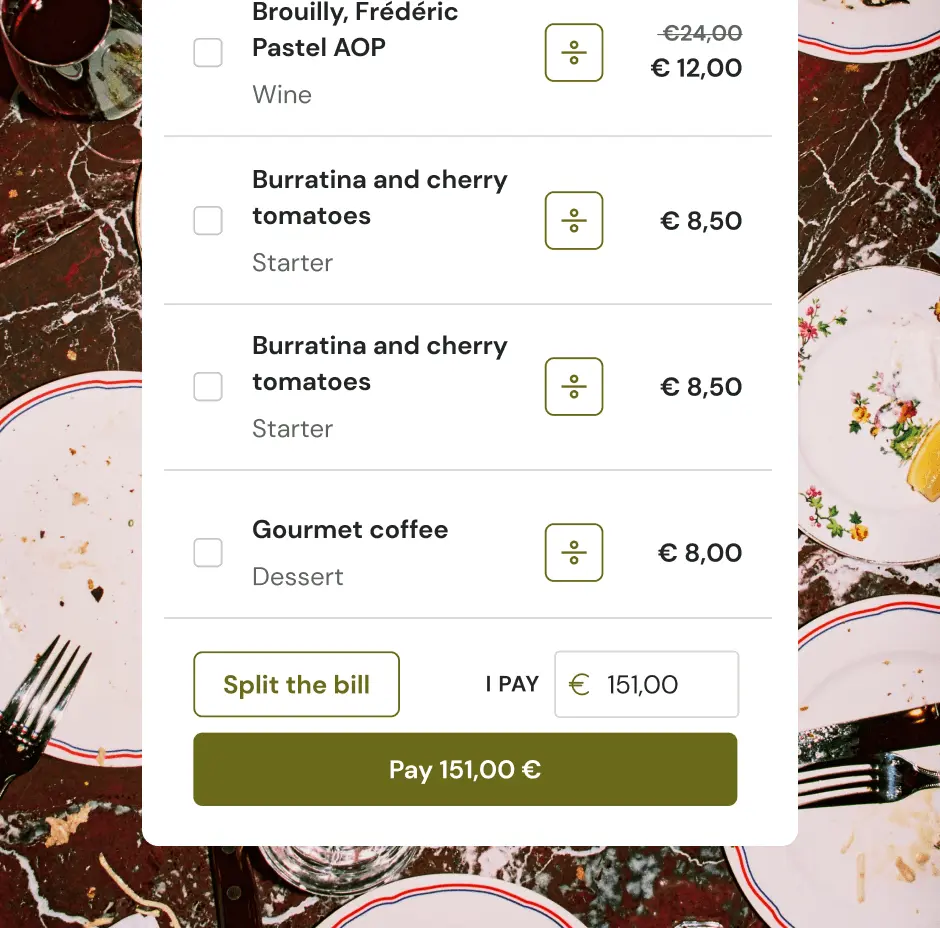
Restaurant bill splitting screen showing items with prices and option to split or pay total 151 euros.
PAY

Guests can pay directly from their mobile with Apple Pay or their card details. Help guests get on their way when they’re ready and free up time for your staff.

Payment in progress screen showing bank authorization checked and payment transfer to restaurant pending.
[

digital QR menus

]

Offer an alternative to paper menus

fast
2 sec
to display the menu
Easy
14k+
menus generated
join
40%
of our customers are using digital menus

Serving every restaurant role

Line drawing of smiling person in apron pointing while standing behind a counter with a register and rack of goods.

Front of House

"Zenchef is easy, time-saving and comfortable. The software opens up a world of possibilities."
read more
Handwritten signature reading 'irene' in light blue on a black background.
Woman sitting on floor, working on laptop at desk near window with a potted plant nearby.

Marketing Manager

"When we started redirecting Zenchef reviews to Tripadvisor, we moved up 100 places in the rankings. Today we're 14th out of 1400 restaurants in Toulouse"
read more
Handwritten signature reading Julia in light blue cursive script on a white background.
Two people sitting at a cafe table sharing a tablet device, smiling and engaged.

Group Owner

"When I look at the daily statistics, I check twice, thinking there is an error. The number of digital reservations we can take monthly with Zenchef is astonishing"
read more
Signature reading Thomas written in light green cursive with a dot at the end.
Line illustration of a person in apron sitting at table with steaming cup and an open sign on door.

Restaurateur

"Zenchef is all about flexibility. It really meets all the expectations I had. The solution offers a very wide range of possibilities, while remaining easy to use."
read more
Cream-colored cursive word 'Senge' on a white background.
Ready to create
exceptional
dining experiences?
Request a demo or get in contact with our sales team. Too busy?
Just leave your contact information, we’ll call you back.

Frequently asked questions

Won’t QR code payment reduce tips?

No, on the contrary – tips left are 25% higher than with a “traditional” payment. Your teams have more time to advise and guide customers in their choices. And that shows up in their tips 😉

How can I update my digital menu?

It’s very simple, and you have total independence here. You can access your Zenchef interface from your computer or tablet and modify your dishes and menus online in a few clicks (the Zenchef application also allows you to modify your stocks, your services, etc.).

What if my customers don’t have a QR code reader?

Today, it’s very easy to download a free QR code scanning application (from Google Play or Apple Store, for example). Especially as the use of QR codes has become more and more popular over the last two years, according to numerous studies (and even more so with the introduction of the health passport). It’s highly likely that your customers already have a flash code on their smartphone.

How can I include a QR code menu on my tables?

Very simply, by sticking a label or metal disc on each table in your restaurant.

How is a QR code generated?

Creating a QR code for a restaurant menu has become very simple. Zenchef automatically generates a QR code once your menu is created or uploaded. It’s fast and isn’t dependent on anyone else. You can also create a different QR code for your wine list, your daily menu, etc., or group everything together on the same menu. Creating a QR code for your menu is a breeze!

What’s a QR code?

Nothing could be simpler! It’s a two-dimensional barcode, in which data is encoded. Once flashed with a QR code reader on a mobile phone, the customer is redirected to a website and a web address (URL). QR codes are often found on business cards or at the entrance to shops and other establishments (and of course on restaurants menu). Codes can also be personalized with a logo in the center, for example.